Studio monitors are designed with a different function than that of a typical set of home speakers. This function is accuracy. This accuracy is presented through a flat frequency response across the audible spectrum at all volumes.
But can a set of studio monitors under $500 promise that level of accuracy?
We think so.
With a bit of research and knowledge on the proper setup and features these monitors have, it can make the entire process a whole lot easier, ensuring you get the most out of your purchase.
We’re rounding up our top monitor picks, at or below $500, that promise premium value for their price.

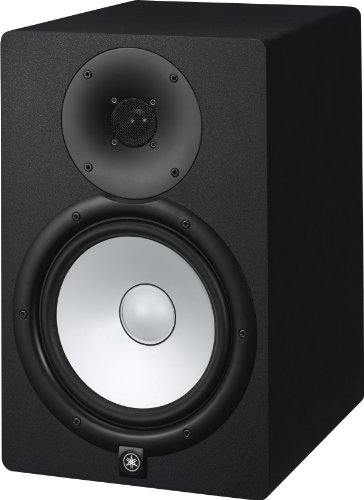
Belonging to the popular HS series, the Yamaha HS8 takes its rightful spot among our top picks.
One of the things that stood out for the Yamaha HS8 was the simple yet appealing aesthetics of the design. Similar to other monitors in the HS series, Yamaha opted for a minimalistic, clean-cut look for the HS8.
Coming in either all white or black, the cabinets, as well as the baffle, are made of good quality MDF. While the aesthetics of the HS8’s design are visually appealing, the build of this monitor is the real star of the show. Yamaha has built the HS8 so robustly that no amount of vibration will get out of these cabs.
At the front of the monitor, the HS8 includes a generous 8-inch cone woofer along with a 1-inch tweeter at the top. Yamaha has designed each of the transducers to be powered separately, so you don’t have to deal with those conflicting frequencies. With 75 watts on the woofer and 45 watts on the tweeter, each monitor is packed with a total of 120 watts.
Around the back, Yamaha has added both room control and high trim response control switches. The source connectivity of the HS8 includes a set of TRS and XLR inputs so that you could link up anything from your iPhone to your DAW.
When we plugged in and set up the HS8, we were thoroughly pleased. Like the rest of the HS series, this monitor proved to be relatively transparent. Yamaha’s definition is impeccable, particularly when you hit the sweet spot in the near field. With so much range, audio enthusiasts and producers have room to work within various genres.
Upsides:
- We loved that the HS8 provides a clean, flat response as well as high and low-frequency extensions with fantastic center imaging.
- The look and build of the HS8’s design is both practical and aesthetically pleasing, which is not common in studio monitors.
Downsides:
- There’s slight distortion when you increase the volume, but nothing too extreme.
- We found the acoustic space control to be somewhat crude.
Bottom Line: The Yamaha HS8 stays true to the HS series, offering great sound and design with a few nice additions, assuring it will be worth the money spent.
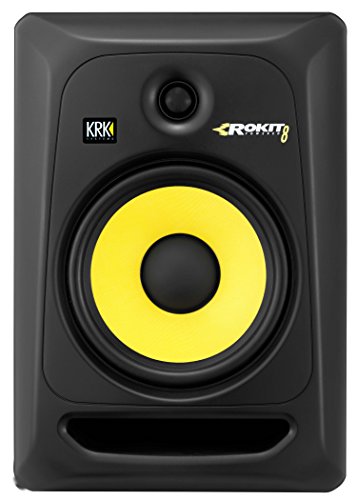
KRK’s Rokit studio monitors have been the go-to product for those looking for affordable speakers that do the job. The KRK RP8G3 is no different.
At first glance, the RP8G3 has a rather striking aesthetic. KRK sustained the signature look of previous Rokit models with the RP8G3, with a black theme and bright yellow woofer. However, the KRK has managed to improve the cabinet and baffle in the RP8G3 compared to previous Rokit generations.
At the front, the cabinets of the RP8G3 are packed with 100 watts of power, featuring a baffle with an 8-inch Aramid glass composite cone woofer and a 1-inch soft dome tweeter. Additionally, the RP8G3 features a front firing port instead of the typical rear position.
At the back, the rear panel features room acoustic controls with high and low-frequency trim switches. When it comes to connectivity, the RP8G3 is generous with several input options, including a balanced TRS port as well as an XLR and unbalanced RCA port.
Regarding performance, the RP8G3 did better than we had thought it would. The RP8G3 offers a decent 38Hz – 35kHz frequency range. At high volumes there were no signs of distortion or clipping; however, we found the bass response to be weak.
Upsides:
- In terms of source connectivity, we loved the multiple options the RP8G3 offered, including the XLR and RCA ports.
- We were surprised by the sound quality of the RP8G3 (both power and volume).
Downsides:
- It doesn’t have as many unique features as other studio monitors in this range, but this doesn’t affect the overall performance.
- We found the bass response mediocre compared to other speakers.
Bottom Line: Despite the eccentric design of the bright yellow woofer, the RP8G3 is a solid piece of equipment for this price range. Although it's far from being a professional monitor, KRK ensures that these speakers will give you your money’s worth.
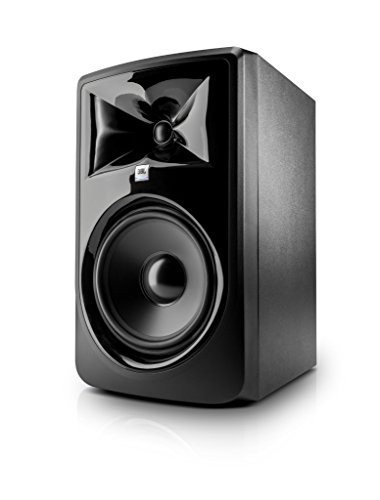
Up next on the list is the ever-so-popular JBL LSR308. Like its younger sister in the 3 series, this JBL is packed with a variety of specs and features.
It comes as no surprise to us that JBL took the LSR305’s successful blueprints and upgraded them to produce the LSR308. Aside from the glossy, jet-black finish, the star of the show is the LSR308’s waveguide.
At the front of the monitor, JBL has stuck to its traditional design, featuring an upscaled 8-inch low-frequency woofer and a 1-inch tweeter. Just like the LSR305, the tweeter sits on a massive waveguide featuring JBL’s impressive image control technology. The LSR308 is bi-amplified with up to 112 watts per cabinet.
At the back of the monitor, JBL has included the high and low-frequency trim controls and input sensitivity switches. The volume knob and power switch are also included at the back along with the source connectors. While the source connectors are few, with only a balanced TSR and XLR port, they offer enough versatility for the average user.
When it came down to how the LSR308 performed, we were pleased with the outcome. The transparency and power, along with a wide sweet spot thanks to the impressive waveguide, provided phenomenal audio quality and a flat response. Unlike the KRK RP8G3, we found the bass response in the LSR308 exceptional, along with a more significant low-end extension.
Upsides:
- We think the massive waveguide at the front for center imaging is an excellent addition.
- It offers exceptional audio quality, impressive bass response, and greater low-end extension.
Downsides:
- It doesn’t have as many inputs regarding connectivity, but the options are versatile enough for convenience.
- Since it’s relatively large, it may be difficult to set up on a small workstation or in a compact room.
Bottom Line: The JBL LSR308 is built on the already solid foundations of its little sister, the LSR305, with a bunch of great features and quality sound; this is an ideal choice for the price range.
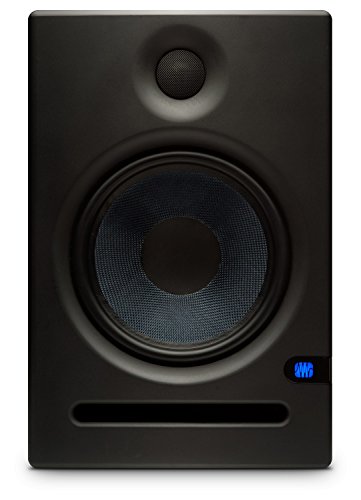
Moving on to a relatively new monitor on the market, we come to the PreSonus Eris E8. The PreSonus Eris series has proven to be rather successful on the market. The Eris E8 upholds that reputation.
Like most other manufacturers, PreSonus has taken the design blueprint of previous models in the Eris series and upscaled it to the Eris E8. Aesthetically, it looks like a larger version of the Eris E5 with a sleek black matte finish.
The cabinets are made of MDF and include an 8-inch woven Kevlar woofer along with a 1.25-inch silk dome tweeter at the front. These transducers combined, give the Eris E8 a generous 130 watts of power at 105 dB peak SPL. The front of the cabinet also features a front firing port.
The rear panel features mid frequency trim controls and a high frequency switch as well as a low cut switch with three options: Flat, 80Hz, and 100Hz. Additionally, PreSonus has included an acoustic space switch.
Regarding performance, the Eris E8 was surprisingly neutral and balanced considering the massive 8-inch low-frequency driver. There is plenty of transparency and a smooth linear response in these monitors. While there are no large waveguides like the LSR308, they deliver an impressive off-axis performance with very little dispersion.
Upsides:
- We loved the variety of options, including the acoustic space switch and trim controls, which give so much to work with when modifying room control.
- We were pleased with the exceptional off-axis performance with plenty of transparency.
Downsides:
- We found the bass response was a little tight compared to other monitors.
- We felt the Eris E8 lacked warmth and found that the sound felt a bit pushed back, rather than blasting out of the speakers.
Bottom Line: The PreSonus Eris E8 offers everything a proper studio monitor in this price range needs, with tons of controls; it certainly hits the spot for those who are on a budget.
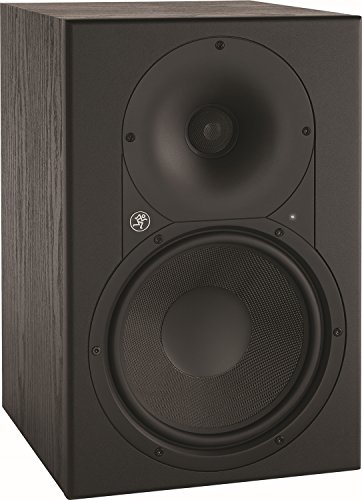
Mackie’s high-end studio monitors tick all the boxes in terms of studio gear necessities, not to mention they’ve got some serious punch. The Mackie XR824 is a more subtle and affordable version of these higher-tier models.
Mackie is renowned for designing studio monitors that may not perform to higher-tier standards, but in fact look like the real deal. The XR824 looks like some serious studio gear with a simple design.
The XR824 cabs have a strong build made of MDF, with an 8-inch Kevlar woofer and a 1-inch aluminum tweeter that sits on a relatively large waveguide. The power of each cabinet is a surprising 160 watts, so there’s plenty of punch in the XR824.
At the back of the monitor, the panel reveals a rear-firing port featuring Mackie’s ELP Bass Reflex System. Mackie broke the tradition of typical control knobs and switches, and instead opted to use buttons for the controls. Regarding source connectivity, Mackie’s XR824 provides TSR and XLR inputs.
We thought the best thing by far about the XR824 was its performance. The response is exceptionally smooth and flat with tons of transparency in the output. Mackie’s choice of a Kevlar cone in the woofer resulted in excellent definition throughout the bass spectrum.
Upsides:
- We were impressed with Mackie’s ELP Bass Reflex System.
- The response is smooth and flat with loads of transparency in the output.
Downsides:
- We were disappointed with the control buttons in the XR824, which limits the flexibility of fine-tuning.
- The XR824 doesn’t do well in untreated rooms and small spaces, so audio enthusiasts with a small working space will find the frequencies and signals meshing together.
Bottom Line: Despite a few quirks in the XR824, Mackie has managed to produce an exceptional studio monitor with a flat response that will get the job done.
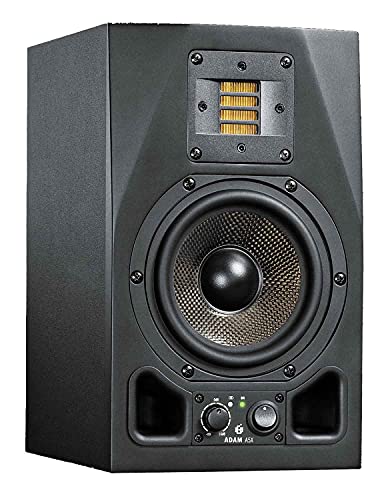
While ADAM is famous for developing superb professional audio gear, they do offer studio monitors in the consumer level market for affordable prices. This is where the ADAM Audio F7 comes in.
Initially, the F7 doesn’t come across as the most aesthetically appealing design. With a black foil finish on the cabinets, the overall look ADAM is going for with this monitor is purely practical.
The cabinets are made of a decent MDF with a relatively classic shape. While the quality of the cabs doesn’t feel as high-end as other monitors, the build of the F7 is quite stable and robust. The cabinets feature a 7-inch woofer alongside the star of the show, which is the unique ribbon tweeter.
The woofer is capable of pushing out 85 watts, while the tweeter is capable of 55 watts, making each cabinet capable of producing a total of 140 watts at 109dB peak SPL.
The frequency range on the F7 is impressive at 44Hz – 50kHz, which means you have the whole range from your lows right up to the highs.
The monitor is equipped with several options, including room EQ controls (6dB) and high (5kHz) and low frequency (300Hz) controls. There's also a toggle switch that engages or bypasses an 80Hz high-pass filter. The inputs of the F7 come in either balanced XLR or unbalanced RCA.
When it comes to how the F7 performs, the sound is incredibly well balanced. The innovative ribbon tweeter delivers a stellar performance in the highs. While the sweet spot isn’t as broad as we would like, the bass is warm, the mids are rich, and the highs are crisp.
Upsides:
- Its ribbon tweeter ensures a crisp, clean sound in the highs.
- It offers solid, powerful sound filled with warm punches in the lows and high soars.
Downsides:
- There’s no magnetic shielding, which we found can lead to a lot of interference.
- The sweet spot isn’t broad enough for us.
Bottom Line: For a high-tier audio manufacturer, ADAM has managed with the F7 to make a reliable, robust monitor with an affordable price tag.
The Verdict…
When it came to narrowing down our options for the best studio monitors under 500, we found ourselves caught between a rock and a hard place. It was a close call between the JBL LSR308 and the Yamaha HS8.
Ultimately, we found that on a professional level the Yamaha HS8 was the ideal choice. While the JBL’s sound was a bit more detailed, we were looking for that optimum flat response, and the Yamaha did just that.
We found Yamaha’s build quality on the HS8 both strong and robust. There’s no way you’ll find any amount of vibration escaping these cabs. Along with its sturdy build, the overall design is both practical and aesthetically pleasing.
The Yamaha HS8’s high and low-frequency extensions and amazing center imaging make it the absolute perfect choice for recording, mixing, and mastering.
Leave a Reply